AI TOOL / #00924
Halo
A handy utility for converting the notch on your Mac into a “Dynamic Island” interface
Introduction
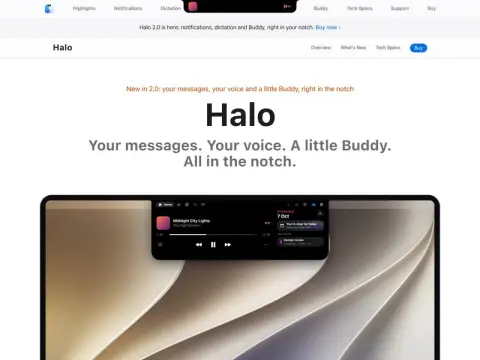
In a nutshell: Add a “Dynamic Island” to the notch on Mac devices. For models without notches or those using external screens, simply draw a line at the top or side of the screen. The functions that can be incorporated through this design include:
- Notice: The notification banners for applications such as Messages, Slack, Mail, and Telegram will now appear within the interface. You can enable or disable these notifications for each application individually, but you will need to have the necessary accessibility permissions enabled.
- Dictation: Hold down the Fn key (or Right Option/Right Command key) while speaking, and the text will be directly inserted at the cursor position. By default, Apple’s voice recognition technology is used; you can also use your own Groq account to enable Whisper mode, which supports eight different languages.
- AI Agent Dashboard: This dashboard shows whether the Claude Code or Codex sessions are currently active, waiting for your authorization, have been completed, or are experiencing issues. The amount of usage is indicated by circles, and next to each indicator, there is a small icon whose expression changes depending on the status of the corresponding agent, as the cursor moves across the dashboard.
- Miscellaneous: Currently playing, volume and brightness controls, file temporary storage interface, timer; on Apple chip-based devices, it is also possible to adjust the brightness of external monitors and select the input source.
It requires macOS 15 or later. The product can be purchased for a one-time fee of $9.99, and one license allows installation on up to 3 Mac devices. Currently, this product has not been officially certified by Apple; therefore, when you first use it, you need to manually enable it in the Privacy & Security settings of your system.
Related
Autopilot for Slack
AI assistant: Unify company data to quickly answer questions related to the workplace.
AskPPT
An AI assistant that lets you chat with your presentation, providing intelligent Q&A and mind maps.
DIDASKO BOT
A tool designed to automate and expedite the completion of user exercises across seven different modules.
AnyQuestions.ai
An AI tool that accurately answers questions by reading and referencing the files you have uploaded.
Ask GPT
A Chrome extension that enables quick and convenient question-and-answer interactions via the ChatGPT API.
ChatGPT Browser Extension
Enhance Google search results, cached content, and the feedback system by utilizing answers generated by ChatGPT.