AI TOOL / #08846
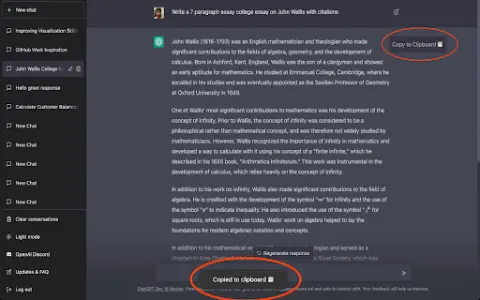
Copy for Chat GPT
An extension used to copy ChatGPT responses and check for plagiarism.
Introduction
Extension to copy ChatGPT responses and check for plagiarism.
What is the Plagiarism Detector Extension for Chrome – an extension/plug-in for Google Chrome?
This extension allows you to copy the responses generated by ChatGPT by clicking a button or using the CMD+K shortcut key, and then have those responses checked by plagiarism detection tools.
How to use the Plagiarism Detector Extension for Chrome?
You can use this extension by clicking the copy button on ChatGPT’s response or by pressing CMD+K. The copied text will be automatically checked to determine whether it contains any plagiarized content.
The core functionality of the Plagiarism Detector Extension for Chrome.
One-click to copy the response from ChatGPT
Use the CMD+K shortcut key to copy.
Automatic plagiarism detection
Use the CMD+K shortcut key to copy.
Automatic plagiarism detection
Related
Autoblogging.ai
AI-based article writing tools that enable the rapid creation of SEO-optimized content.
Writesonic
AI writing tools used for SEO content, advertising, blogging, paragraph rewriting, as well as AI-generated conversations and images.
Restore Photos
An AI-based platform for restoring old, blurry, and black-and-white photos.
AnythingLLM
full-stack application
Collov AI
Interior Home Design Tools
Opus
Opus is a 3D creation platform that turns text into video.