AI TOOL / #07462
Vision AI
A Chrome extension that enables AI-driven insights based on screenshot data.
Introduction
Chrome extension for AI-powered insights from screenshots.
What is a Vision AI Chrome extension/plug-in?
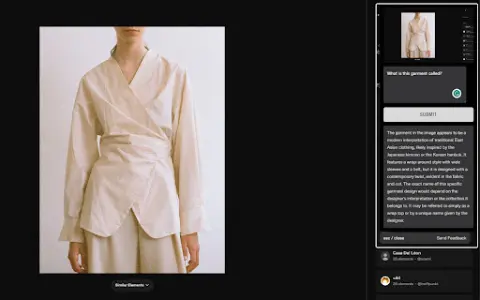
Visual AI is a Chrome extension that combines screenshot functionality with AI-driven insights to enhance online information search. It allows users to capture any portion of a web page, add notes or questions, and receive AI-generated responses based on the context of the captured image.
How to use the Vision AI Chrome extension/plug-in?
Install the Visual AI Chrome extension. Use CTRL + SHIFT + Y to take a screenshot, and then add any notes or questions you have. Visual AI will analyze the screenshot and provide an AI-generated response.
The core functions of the Vision AI Chrome extension/plugin
Screenshot capture
Interactive AI Suggestions
Seamless browser integration
Suitable for a wide range of applications in various fields
Privacy and Security
Interactive AI Suggestions
Seamless browser integration
Suitable for a wide range of applications in various fields
Privacy and Security
Related
Typebot
An open-platform tool designed for creating and integrating advanced chatbots on websites and chat platforms.
ChatHub
An integrated chatbot client that supports multiple large-scale language models and provides multiple AI tools.
Chatbase
A platform for building and deploying AI agents to support customers and grow revenue.
Ask Marcus
An AI chatbot that engages in conversations about Stoicism with Marcus Aurelius.
Breezy.chat
A seamless ChatGPT user interface, featuring historical search capabilities and the ability to customize one’s profile settings.
Folo AI Toy
AI conversational toys for kids that listen, grow and create meaningful connections.