AI TOOL / #07222
ReadImage
Extract, edit, and copy text from images on web pages.
Introduction
Extracts, edits, and copies text from images on web pages.
What is Image Text Extractor ai chrome extension/plugin?
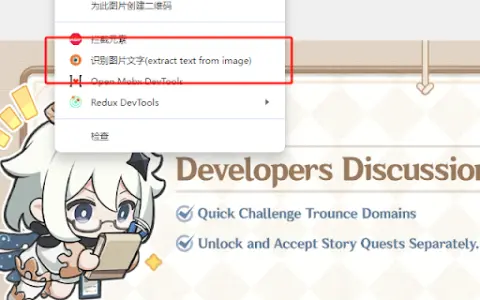
This extension allows users to extract text from images displayed on web pages. It supports common image formats such as jpg, jpeg, png and bmp. After extraction, the text can be edited and copied.
How to use Image Text Extractor ai chrome extension/plugin?
Hover your mouse over the image, right-click and select "Extract text from image". Press "Ctrl + Q" to view the extracted text on the extension page, where it can be edited and copied.
Image Text Extractor ai chrome extension/plugin core features
Extract text from images on web pages
Edit extracted text
Copy extracted text
Edit extracted text
Copy extracted text
Related
hCaptcha
An artificial intelligence security platform that focuses on privacy, designed to prevent both robots and humans from misusing its capabilities.
Eduwriter.ai
AI Thesis Assistant – provides papers that are impossible to detect as plagiarized, as well as genuine references.
Upful.ai Chrome Extension
Upful improves inclusion in the workplace by guiding the use of bias-free language in assessments and communications.
Aftercare
An AI-driven investigation platform that features intelligent follow-up questions and automated data analysis capabilities.
Quaind
An AI-based automation platform for web testing quality assurance.
Kokoro
Browser extensions that offer AI-powered features to simplify online research.