AI TOOL / #06688
Vocha | Voice for ChatGPT
Vocha is a voice input extension specifically designed for ChatGPT, with an emphasis on privacy and ease of use.
Introduction
Vocha is a voice-typing extension for ChatGPT with a focus on privacy and ease of use.
What is the Vocha AI Chrome extension/plug-in?
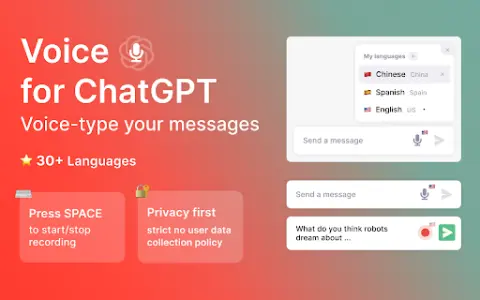
Vocha is a browser extension that allows users to input messages for ChatGPT via voice. It adds a microphone button to the message input field, which can be activated by using the SPACE key or by clicking on it. Vocha places great emphasis on user privacy, strictly adheres to policies that prohibit the collection of user data, and features a clean, minimalist design that ensures seamless integration with the ChatGPT interface.
How to use the Vocha AI Chrome extension/plug-in?
After installing the Vocha extension, a microphone button will appear in the ChatGPT message input box. You can press the SPACE shortcut key or click the microphone button to start and stop recording. You can change the language used for speech recognition by clicking on the flag icon. Remember to grant the microphone access permission during the installation process.
The core functions of the Vocha for Chrome extension/plugin
Provide voice input for messages sent via ChatGPT.
The SPACE shortcut key is used to start/stop recording.
Supports multiple languages (over 30 different languages).
Message editing options (send, edit, or continue recording)
Related
ChatScreen: Sider 2.0 for iOS
Artificial intelligence chatbots and assistants designed to interact with screen content and files.
Telescope: AI-powered Web Clipper
Leveraging artificial intelligence-based knowledge bases, faster information retrieval becomes possible.
MenuGuide
AI-powered app for instant men...
AlgoDocs
An artificial intelligence-driven automated platform for extracting data from documents.
Expenses Day
The digitization of expenses, based on artificial intelligence, includes receipts, bank statements, handwritten lists, and more.
Table OCR – Extract tabular data from Pdf/Img
Table OCR extracts data from tables within images or PDF files and converts it into a structured format.