AI TOOL / #06135
Ask Screenshot for ChatGPT
Improve ChatGPT productivity by analyzing screenshots and selected text.
Introduction
Enhances ChatGPT productivity by analyzing screenshots and selected text.
What is the Ask Screenshot AI Chrome extension/plugin?
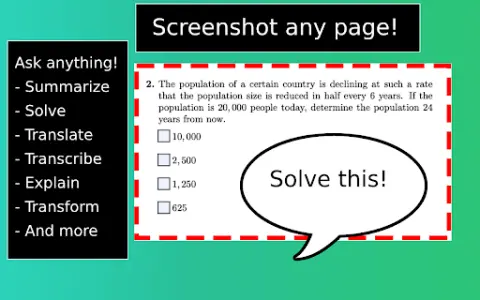
Ask Screenshot is a tool designed to improve productivity in ChatGPT, allowing users to analyze screenshots or selected text directly within ChatGPT. It offers features such as summarization, transcription, and translation, making it easier to extract information and process content from visual and textual sources.
How do I use the Ask Screenshot AI Chrome extension/plugin?
To use Ask Screenshot, right-click anywhere on any page and hover over Ask GPT to access the available screenshot templates. For selected text, right-click the selected text and hover over Ask GPT to view the available templates.
Core features of the Ask Screenshot AI Chrome extension/plugin
Screenshot and analyze: Take a screenshot and automatically open it in ChatGPT for analysis.
Text selection and analysis: Right-click any selected text to automatically open it in ChatGPT.
Text selection and analysis: Right-click any selected text to automatically open it in ChatGPT.
Related
Dextools Analyser
An AI-powered browser extension that provides real-time technical analysis of encrypted tokens on both Dexscreener and Dextools.
GoExchange
A browser extension that uses machine learning to predict currency trends.
CloudVerse.ai
A multi-cloud cost management platform designed to optimize cloud spending.
Cardamon
AI-driven automation of compliance processes in financial companies.
Billabex
An artificial intelligence-based solution for automated invoice recovery and payment reminder services.
Rose AI
Rose AI: A cloud data platform for data discovery, visualization and analysis.