AI TOOL / #05336
Legal Red Flag Detector
A Chrome extension that uses AI to identify potentially problematic elements in legal documents.
Introduction
Chrome extension that uses AI to detect red flags in legal documents.
What is the Legal RedFlag Detector AI Chrome extension/plug-in?
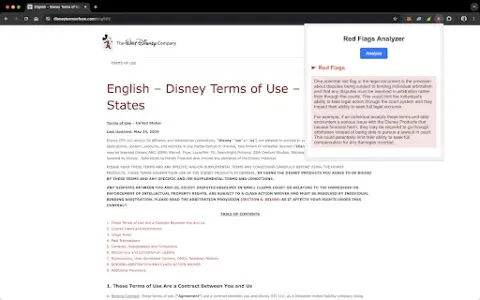
The Legal Red Flags Detector is a Chrome extension designed to identify potential red flags in legal documents, such as terms of service, privacy policies, and user agreements. It utilizes AI technology to highlight clauses that may be harmful to users and provides clear explanations, eliminating the need for legal expertise.
How to use the Legal RedFlag Detector AI Chrome extension/plug-in?
Install the extension, open the web page containing the legal document, and click “Analyze” in the pop-up window. This will display highlighted sections marked with red flags, along with simple explanations.
The core functionality of the Legal RedFlag Detector AI Chrome extension/plugin
Automatic analysis of legal documents
Prominent clauses regarding potential issues
A popular explanation of the red flag
Intuitive interface in the pop-up window
Related
ASSIST Biz
ASSIST is a document management software for financial recordkeeping with automated data extraction capabilities.
FormToExcel
Use AI to convert forms and images into Excel files, thereby enabling automatic data extraction.
O.Translator
AI-based document translation tool that maintains the original format.
AnyParser
AnyParser simplifies the process of data entry by enabling accurate data extraction and providing effective privacy protection measures.
Pizi – AI Assistant for Multiple PDFs
An AI assistant designed for multi-file analysis, document summarization, translation, and the solution of mathematical problems.
PoliticHook
PoliticHook tracks congressional stock trades and sends real-time alerts.