AI TOOL / #04236
DeepSeek AI
An AI-powered tool for analyzing web content and providing answers.
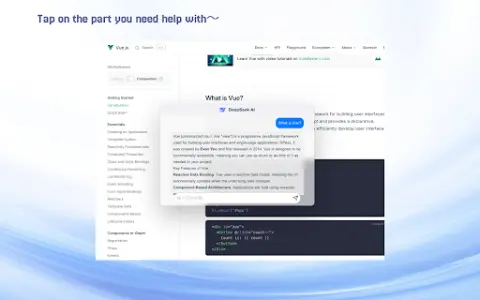
Introduction
AI-powered tool for web content analysis and answering.
What is the DeepSeek AI Chrome extension/plug-in?
DeepSeek is an AI-powered tool designed to provide users with intuitive and efficient capabilities for analyzing web content and obtaining answers. By selecting text from a webpage, users can leverage DeepSeek’s advanced AI models to obtain in-depth analyses and relevant information.
How to use the DeepSeek AI Chrome extension/plug-in?
1. Install the DeepSeek extension from the Chrome Web Store.
2. Enter your API key to activate the custom AI service.
3. Select the text on the web page, right-click on it, and choose DeepSeek to obtain intelligent answers.
2. Enter your API key to activate the custom AI service.
3. Select the text on the web page, right-click on it, and choose DeepSeek to obtain intelligent answers.
The core functions of the DeepSeek AI Chrome extension/plug-in
Intelligent responses to the text on the selected web page
Customize API integration to enable personalized AI services.
Multi-language support
User-friendly interface
Protect privacy through local data processing.
Customize API integration to enable personalized AI services.
Multi-language support
User-friendly interface
Protect privacy through local data processing.
Related
AnswerWriting
An artificial intelligence-based platform designed for practice and assessment in answering questions for the UPSC and state PSC examinations.
Saywise
Saywise connects professionals with those seeking advice through live video Q&A sessions, and generates short Q&A pairs created by AI.
Dashworks ai
Dashworks unifies company knowledge to provide instant AI answers across all applications.
Stonly Browser Extension
Stoney provides contextual guidance and a knowledge base to support customer services and agents.
SMART TOOLS
Intelligent Tools: Leverage your comprehensive AI-based sales and marketing solutions to achieve predictable B2B growth.
Edstension
Chrome extensions for EdStem and Moodle offer AI-generated answers as well as LaTeX preview functionality.