AI TOOL / #04208
Shift-Ctrl-F: Semantic Search for the Browser
A Chrome extension that uses MobileBERT to search for and highlight answers on web pages.
Introduction
Chrome extension using MobileBERT to search and highlight answers on webpages.
What is the Shift-Ctrl-F Chrome extension/plugin?
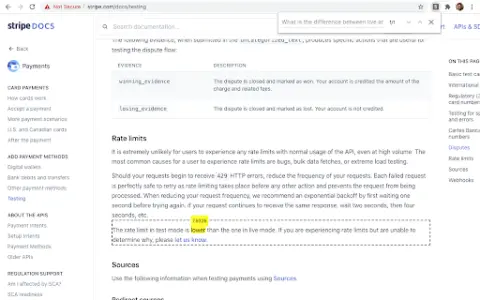
Shift-Ctrl-F is a Chrome extension that utilizes the MobileBERT model, which has been fine-tuned using the SQuAD dataset. This extension uses TensorFlowJS to search for answers on web pages and identify relevant elements. It allows users to enter natural-language queries and find corresponding answers within the content of the current page.
How to use the Shift-Ctrl-F Chrome extension/plugin?
1) Open the extension pop-up window using the toolbar or shortcut key (Shift-Ctrl-F).
2) Enter your natural language query in the search box.
3) Press Enter and wait for the model to return the results.
The core functionality of the Shift-Ctrl-F Chrome extension/plug-in.
Conduct natural language question-and-answer interactions on web pages.
Highlight relevant elements based on the search query.
Efficient processing using MobileBERT
Highlight relevant elements based on the search query.
Efficient processing using MobileBERT
Related
JobCopilot
An intelligent platform that increases the chances of obtaining interviews by automating the process of submitting job applications.
PBI Pilot – Seu assistente de Power BI
Power BI utilizes generative artificial intelligence to enable real-time data interaction, queries, and chart generation.
DataSquirrel.ai
An AI-powered data analytics platform for non-technical users that automates data cleaning, analysis, and visualization.
reeyee
Code-free AI-driven platform for building professional dashboard websites.
Kvery.io
An AI-powered SQL editor for database management and automation.
Sequel
An AI-based business intelligence platform that uses natural language to query and analyze databases.