AI TOOL / #04080
Explain Selected
A browser extension that uses ChatGPT to provide definitions and explanations for the selected text.
Introduction
A browser extension that provides definitions and explanations of selected text using ChatGPT.
What is the “Explain Selected” AI Chrome extension/plug-in?
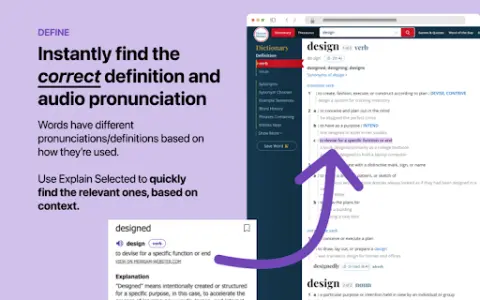
The option to use ChatGPT allows you to instantly find relevant definitions and audio pronunciations from Merriam-Webster’s dictionary, based on the context in which a word is used. It also provides personalized explanations for any content you read online, ranging from slang to technical terms. Simply select any word or phrase on a web page and click the purple circle that appears. You can also save the items you want to remember to a personal list or share them with friends! This feature is particularly useful for words that have multiple meanings. Take the word “pound”, for example: does it refer to weight, an action, or the British currency? Unlike other dictionary apps, this feature intelligently resolves contextual ambiguity and determines the appropriate meaning based on the context in which the word is used.
How to use the “Explain Selected” AI Chrome extension?
1. Select any word or phrase on the web page. 2. Click on the purple circle that appears.
Describe the main functions of the selected AI Chrome extensions/plugs.
Instant definitions and audio pronunciations from Merriam-Webster Dictionary.
Personalized explanations for slang terms and technical jargon.
Resolve contextual ambiguities in words that have multiple meanings.
Save the selected items to your personal list for easy reference.
Share your choices with friends.
Personalized explanations for slang terms and technical jargon.
Resolve contextual ambiguities in words that have multiple meanings.
Save the selected items to your personal list for easy reference.
Share your choices with friends.
Related
New Specsight
Translating code changes into product updates
New Searchtok
A popular short-video search platform designed for intelligent agents
New Soniox
Multilingual real-time voice AI interface
New Woven Video
Conversational AI video editing on Mac
The new CrewTower
Integrate the programming agent into the notch of the Mac.
New Wron
Create a native app that is ready to be launched on the market in just one step.