AI TOOL / #04050
AI Roundtable
Ask a question and receive answers from multiple AI assistants.
Introduction
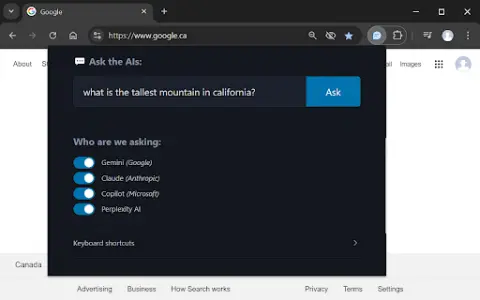
Ask one question, get answers from multiple AI assistants.
What is a Multiple AI Assistants Chrome extension/plug-in?
This website allows users to submit questions at once and receive answers from multiple AI assistants. Users can customize which assistant they want to use for their queries. The website also provides keyboard shortcuts, making it easy to access various functions quickly.
How to use the Multiple AI Assistants Chrome extension?
Use the shortcut keys Ctrl/Cmd + Shift + Q to open the query window and start typing your question. Use Alt + 1 to switch to Gemini, Alt + 2 to switch to Claude, Alt + 3 to switch to Copilot, and Alt + 4 to switch to ChatGPT.
The core functions of various AI Assistant extensions/plugins for Chrome.
Query multiple AI assistants simultaneously
It is possible to customize the selection of AI assistants.
Convenient and fast keyboard shortcuts
It is possible to customize the selection of AI assistants.
Convenient and fast keyboard shortcuts
Related
Interview Scheduling by Sapia.ai (Beta)
A plugin that simplifies and optimizes interview scheduling.
Asistee
Virtual assistant services designed specifically for operational needs and specialized tasks.
Chronify
Chronify is an AI-powered personal assistant dedicated to helping users with scheduling, communication, and task management.
InboxPro
An AI-powered email management tool designed to simplify customer acquisition and nurturing.
routine.co
A versatile work platform that assists individuals and teams in organizing their tasks and enhancing productivity.
AutoCal.ai
Artificial intelligence-powered tools designed to quickly create calendar events based on user inputs.