AI TOOL / #03920
ChatGPTalk Sidebar
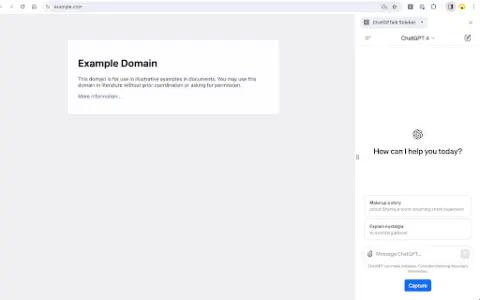
The ChatGPT integration in the sidebar facilitates text capture and interaction.
Introduction
ChatGPT integration in a sidebar for easy text capture and interaction.
What is the ChatGPTTalk Sidebar AI Chrome extension/plug-in?
The ChatGPTTalk Sidebar extension enhances the web browsing experience by integrating ChatGPT into a convenient sidebar. It allows users to extract text from web pages or YouTube subtitles and automatically copy it into the ChatGPT input field for generating summaries or performing other interactions. This extension also includes prompt templates and intelligent text segmentation features, which make it easier to work with longer documents.
How to use the ChatGPTTalk Sidebar AI Chrome extension/plug-in?
Install the ChatGPTTalk Sidebar extension. Open a web page or a YouTube video, and then click the “Capture” button in the sidebar to extract the text or subtitles. The extracted text will be automatically copied and pasted into the ChatGPT input field, along with a predefined prompt template. You can then interact with ChatGPT as needed.
The core functions of the ChatGPTTalk Sidebar AI Chrome extension/plugin
Integration of ChatGPT
Text capture
prompt template
YouTube subtitles
Intelligent text segmentation
Text capture
prompt template
YouTube subtitles
Intelligent text segmentation
Related
ChaptersAI
The GPT client designed for branched conversations is ideal for complex projects and in-depth analyses.
Meoria
Meoria is a free AI-powered ap...
Whizi
Whizi is an AI center that boasts over 200 different AI models, including ChatGPT, Claude, and Stable Diffusion.
Chat Gemini
A free, easy-to-use chat AI bot based on the Google Gemini API.
Mumble
Mumble revolutionizes WhatsApp communication for businesses, providing tools for customer management and sales automation.
Fusion AI
An AI platform that integrates cutting-edge models to simplify the process of obtaining high-quality results.